
Supacode: a command center for herding coding agents
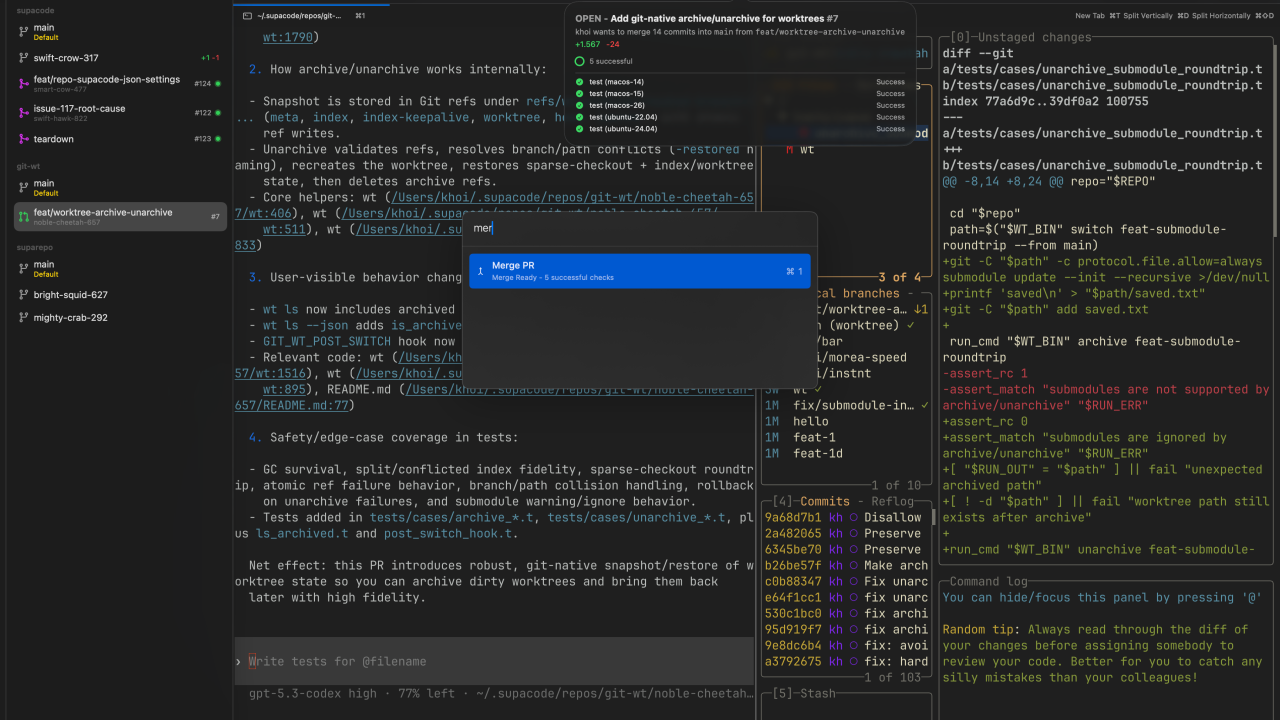
I have a bad habit: when Claude Code or Codex is chewing on a task, I open another terminal tab and start a second one. Then a third. Twenty minutes later I have no idea which pane is waiting on me, which one wrote to which branch, or why my working tree looks like a crime scene. Supacode is a native macOS app built specifically for that mess, and I have been poking at it enough to write down what it actually is.
What it actually is
Supacode calls itself a "worktree coding agents command center." In plain terms: it is a native macOS app that lets you run a pile of CLI coding agents in parallel, each isolated in its own git worktree and its own terminal session. The marketing line is "50+ agents at once," which I read as "more than you should sanely run" rather than a literal daily target.
It is bring-your-own-agent. There is no proprietary model or wrapper: it drives whatever CLI you already use — Claude Code, Codex, Opencode, Copilot — and just manages the surrounding chaos. It is written in Swift on top of libghostty (the terminal core from Ghostty), so there is no Electron layer. On a Mac, that difference is genuinely noticeable in scroll and keystroke latency.
The parts that earn their keep
The worktree-per-agent idea is the whole point, and it is a good one. Instead of agents trampling each other in one checkout, each task gets its own isolated branch and directory. A few features build on that:
- Presence badges. Each pane shows whether its agent is busy, idle, or waiting on input, and it notifies you. So you stop babysitting terminals.
- GitHub awareness. The sidebar surfaces PR state, CI checks, and merge readiness. It leans on the
ghCLI rather than replacing it. - Session persistence. A bundled
zmxdaemon keeps sessions alive across app restarts and SSH drops, so a long agent run survives you quitting the app. - CLI and deeplinks. There is a
supacodecommand andsupacode://deeplinks for scripting.
The real win is not "more agents." It is not having to remember which of eight terminals is quietly waiting for me to type "yes."
Getting it running
The easy path is Homebrew, or a free beta DMG from the site. Note the hard requirement up front: macOS 26 (Tahoe) or newer.
# install the app
brew install supacode

# or build from source (Swift + libghostty submodules)
git clone --recursive git@github.com:supabitapp/supacode.git
cd supacode
mise install
make doctor   # checks build prerequisites
make run-app
From there the flow is: add a repository, create a worktree, and open a terminal pane in it with your agent of choice. Ryan Orban and a few others have written up their setups; Bret Fisher recorded a walkthrough that shows the panes-and-badges workflow better than a screenshot can.
The honest caveats
I like it, but this is a young project and it shows. A few things to weigh before you commit:
- macOS 26 only. If you are on Sonoma or Sequoia, you are simply out. That is a steep floor for a terminal tool.
- "Open source" with an asterisk. It is source-available under the Functional Source License (FSL-1.1-ALv2), which converts to Apache 2.0 later. Great for tinkering; your legal team may still raise an eyebrow, since it is not a standard OSI license today.
- Small blast radius. Adoption appears modest and development is driven largely by one person (khoi, of Supabit). The bus factor is low, so treat it as a promising beta, not infrastructure.
- It does not replace your terminal. Reviewers keep plain Ghostty around for quick compiles and log-grepping. Supacode is for the agent-herding case specifically.
My take after a few sessions: if you already run multiple agents on a modern Mac, Supacode removes a real, daily papercut, and the native performance is not a gimmick. If you are on an older macOS or need a boring license, sit this one out for now and check back.